







修改图片分辨率的工具Python源码
作者:小编日期:2026-01-16浏览:4862分类:只有源码
import tkinter as tk
from tkinter import ttk, filedialog, messagebox
from PIL import Image
import os
class ImageResizerApp:
def __init__(self, root):
self.root = root
self.root.title("图片分辨率修改工具")
self.root.geometry("800x650")
self.root.configure(bg="#f0f0f0")
self.image_paths = []
self.target_width = tk.IntVar(value=800)
self.target_height = tk.IntVar(value=600)
self.keep_aspect_ratio = tk.BooleanVar(value=True)
self.output_path = ""
self.setup_ui()
def setup_ui(self):
title_label = tk.Label(
self.root,
text="图片分辨率修改工具",
font=("Arial", 18, "bold"),
bg="#f0f0f0",
fg="#333"
)
title_label.pack(pady=15)
main_frame = tk.Frame(self.root, bg="#f0f0f0")
main_frame.pack(fill=tk.BOTH, expand=True, padx=20, pady=10)
control_frame = tk.LabelFrame(
main_frame,
text="控制面板",
font=("Arial", 12),
bg="#f0f0f0",
fg="#333",
padx=10,
pady=10
)
control_frame.pack(side=tk.LEFT, fill=tk.Y, padx=(0, 10))
resolution_frame = tk.LabelFrame(
control_frame,
text="分辨率设置",
font=("Arial", 10),
bg="#f0f0f0",
fg="#333"
)
resolution_frame.pack(fill=tk.X, pady=(0, 15))
width_frame = tk.Frame(resolution_frame, bg="#f0f0f0")
width_frame.pack(fill=tk.X, pady=5)
tk.Label(width_frame, text="宽度:", font=("Arial", 10), bg="#f0f0f0").pack(side=tk.LEFT)
width_entry = tk.Entry(
width_frame,
textvariable=self.target_width,
font=("Arial", 10),
width=10
)
width_entry.pack(side=tk.RIGHT)
height_frame = tk.Frame(resolution_frame, bg="#f0f0f0")
height_frame.pack(fill=tk.X, pady=5)
tk.Label(height_frame, text="高度:", font=("Arial", 10), bg="#f0f0f0").pack(side=tk.LEFT)
height_entry = tk.Entry(
height_frame,
textvariable=self.target_height,
font=("Arial", 10),
width=10
)
height_entry.pack(side=tk.RIGHT)
aspect_check = tk.Checkbutton(
resolution_frame,
text="保持原始宽高比",
variable=self.keep_aspect_ratio,
font=("Arial", 10),
bg="#f0f0f0"
)
aspect_check.pack(pady=5)
io_frame = tk.LabelFrame(
control_frame,
text="导入导出设置",
font=("Arial", 10),
bg="#f0f0f0",
fg="#333"
)
io_frame.pack(fill=tk.X, pady=10)
tk.Label(io_frame, text="导入图片:", font=("Arial", 10), bg="#f0f0f0").pack(anchor=tk.W, pady=(0, 5))
self.import_path_var = tk.StringVar(value="未选择")
import_path_label = tk.Label(
io_frame,
textvariable=self.import_path_var,
font=("Arial", 9),
bg="#ffffff",
relief=tk.SUNKEN,
anchor=tk.W
)
import_path_label.pack(fill=tk.X, pady=(0, 5))
import_btn = tk.Button(
io_frame,
text="导入图片",
command=self.import_images,
bg="#4CAF50",
fg="white",
font=("Arial", 10, "bold"),
relief=tk.FLAT,
padx=10,
pady=5
)
import_btn.pack(fill=tk.X, pady=5)
tk.Label(io_frame, text="输出路径:", font=("Arial", 10), bg="#f0f0f0").pack(anchor=tk.W, pady=(0, 5))
self.output_path_var = tk.StringVar(value="未选择")
output_path_label = tk.Label(
io_frame,
textvariable=self.output_path_var,
font=("Arial", 9),
bg="#ffffff",
relief=tk.SUNKEN,
anchor=tk.W
)
output_path_label.pack(fill=tk.X, pady=(0, 5))
select_output_btn = tk.Button(
io_frame,
text="选择输出路径",
command=self.select_output_path,
bg="#9C27B0",
fg="white",
font=("Arial", 10, "bold"),
relief=tk.FLAT,
padx=10,
pady=3
)
select_output_btn.pack(fill=tk.X)
button_frame = tk.Frame(control_frame, bg="#f0f0f0")
button_frame.pack(fill=tk.X, pady=10)
start_btn = tk.Button(
button_frame,
text="开始处理",
command=self.start_processing,
bg="#2196F3",
fg="white",
font=("Arial", 10, "bold"),
relief=tk.FLAT,
padx=10,
pady=5
)
start_btn.pack(fill=tk.X, pady=5)
reset_btn = tk.Button(
button_frame,
text="重置",
command=self.reset,
bg="#FF9800",
fg="white",
font=("Arial", 10, "bold"),
relief=tk.FLAT,
padx=10,
pady=5
)
reset_btn.pack(fill=tk.X, pady=5)
exit_btn = tk.Button(
button_frame,
text="退出",
command=self.root.quit,
bg="#f44336",
fg="white",
font=("Arial", 10, "bold"),
relief=tk.FLAT,
padx=10,
pady=5
)
exit_btn.pack(fill=tk.X, pady=5)
list_frame = tk.LabelFrame(
main_frame,
text="图片列表",
font=("Arial", 12),
bg="#f0f0f0",
fg="#333",
padx=10,
pady=10
)
list_frame.pack(side=tk.RIGHT, fill=tk.BOTH, expand=True)
columns = ('filename', 'original_size', 'format')
self.tree = ttk.Treeview(list_frame, columns=columns, show='headings', height=5)
self.tree.heading('filename', text='文件名')
self.tree.heading('original_size', text='原始尺寸')
self.tree.heading('format', text='格式')
self.tree.column('filename', width=200)
self.tree.column('original_size', width=100)
self.tree.column('format', width=80)
scrollbar = ttk.Scrollbar(list_frame, orient=tk.VERTICAL, command=self.tree.yview)
self.tree.configure(yscrollcommand=scrollbar.set)
self.tree.pack(side=tk.LEFT, fill=tk.BOTH, expand=True)
scrollbar.pack(side=tk.RIGHT, fill=tk.Y)
def import_images(self):
supported_formats = [
("All Supported Images", "*.jpg;*.jpeg;*.png;*.bmp;*.gif;*.tiff;*.webp;*.ico"),
("JPEG", "*.jpg;*.jpeg"),
("PNG", "*.png"),
("BMP", "*.bmp"),
("GIF", "*.gif"),
("TIFF", "*.tiff"),
("WEBP", "*.webp"),
("All Files", "*.*")
]
filenames = filedialog.askopenfilenames(
title="选择图片文件",
filetypes=supported_formats
)
if filenames:
for filename in filenames:
if filename not in self.image_paths:
self.image_paths.append(filename)
if len(filenames) > 1:
directories = set(os.path.dirname(path) for path in filenames)
if len(directories) == 1:
common_dir = list(directories)[0]
display_text = f"来自同目录: {os.path.basename(common_dir)} ({len(filenames)}张)"
else:
display_text = f"多目录导入 ({len(filenames)}张)"
self.import_path_var.set(display_text)
elif len(filenames) == 1:
self.import_path_var.set(os.path.dirname(filenames[0]))
else:
self.import_path_var.set("未选择")
self.refresh_image_list()
def refresh_image_list(self):
for item in self.tree.get_children():
self.tree.delete(item)
for path in self.image_paths:
try:
img = Image.open(path)
size_str = f"{img.width}x{img.height}"
format_str = img.format or "Unknown"
filename = os.path.basename(path)
self.tree.insert('', tk.END, values=(filename, size_str, format_str))
except Exception as e:
print(f"无法读取图片 {path}: {e}")
def start_processing(self):
if not self.image_paths:
messagebox.showwarning("警告", "请先导入图片!")
return
if not self.output_path:
self.output_path = filedialog.askdirectory(title="选择输出目录")
if not self.output_path:
return
self.output_path_var.set(self.output_path)
target_w = self.target_width.get()
target_h = self.target_height.get()
if target_w <= 0 or target_h <= 0:
messagebox.showerror("错误", "请输入有效的分辨率值!")
return
success_count = 0
error_count = 0
for img_path in self.image_paths:
try:
with Image.open(img_path) as img:
original_size = img.size
if self.keep_aspect_ratio.get():
original_ratio = original_size[0] / original_size[1]
target_ratio = target_w / target_h
if original_ratio > target_ratio:
new_width = target_w
new_height = int(target_w / original_ratio)
else:
new_height = target_h
new_width = int(target_h * original_ratio)
resized_img = img.resize((new_width, new_height), Image.Resampling.LANCZOS)
else:
resized_img = img.resize((target_w, target_h), Image.Resampling.LANCZOS)
base_name = os.path.splitext(os.path.basename(img_path))[0]
extension = os.path.splitext(img_path)[1]
output_path = os.path.join(self.output_path, f"{base_name}{extension}")
counter = 1
original_output_path = output_path
while os.path.exists(output_path):
name_part = os.path.splitext(original_output_path)[0]
ext_part = os.path.splitext(original_output_path)[1]
output_path = f"{name_part}_resized_{counter}{ext_part}"
counter += 1
resized_img.save(output_path, optimize=True, quality=95)
success_count += 1
except Exception as e:
print(f"处理图片失败 {img_path}: {e}")
error_count += 1
messagebox.showinfo(
"处理完成",
f"成功处理 {success_count} 张图片\n{error_count} 张图片处理失败"
)
def reset(self):
self.image_paths.clear()
self.target_width.set(800)
self.target_height.set(600)
self.keep_aspect_ratio.set(True)
self.output_path = ""
self.output_path_var.set("未选择")
self.refresh_image_list()
def select_output_path(self):
"""选择输出路径"""
selected_path = filedialog.askdirectory(title="选择输出目录")
if selected_path:
self.output_path = selected_path
self.output_path_var.set(selected_path)
if __name__ == "__main__":
root = tk.Tk()
app = ImageResizerApp(root)
root.mainloop()
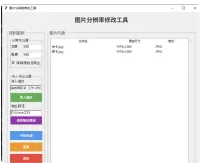
因为工作需要,要改各种尺寸的图片,用 ps 修改之后,发现与我修改的还是不太一样,于是就有了这个代码,可以写好尺寸一键修改,并且可以导入多张图片
款式就是这几样的:
相关文章
- 04-07 帝国CMS下载站文章图片视频商城淘宝客整站源码模板自适应响应式
- 04-07 阿里巴巴国际站支持wordpress商品浏览器采集插件
- 03-29 新版黄金价格监控源码(K线图模块,黄金舆情模块,AI智能客服)
- 03-29 APK免杀系统源码+搭建教程
- 03-29 老司机瀑布流壁纸源码
- 03-29 vue租号系统源码/租号玩平台源码/游戏账号出租系统/虚拟账号出租平台源码
- 03-24 马年宝宝起名网站源码,php源码全自动运营好项目
- 03-17 2026全新UI解析计费系统源码 附教程
- 03-17 汽修单管理系统源码
- 03-16 随机美女图片瀑布流源码
- 03-11 挂机修仙-做了个安卓文字挂机游戏,继续开源
- 03-01 最新版网页版软件库源码有后台,精美ui全套源码+教程
取消回复欢迎你发表评论:

- 协助本站优化一下
- 最近发表
- 1AirBrush 智能Ai修图 v8.6.5 破解高级版
- 2VLLO视频编辑器 v12.16.18 破解高级版
- 3佐糖 PicWish v2.3.0 破解高级版
- 4快捷记账 v4.10.9 破解专业版
- 5VN视频剪辑app v2.13.0 破解Pro专业版
- 6Busuu博树app v32.35.0 破解高级版
- 7七猫免费小说 v7.94 去广告 破解VIP版
- 8 【眼福最新】网红可可裸拍舞蹈小庚网专属福利来了 前10送实物福利
- 9【听点音乐Pro】1.0.4 热门音乐歌单免费听 解锁VIP
- 10【北斗一下卫星地图】6.0 足不出户360°看世界 解锁VIP
- 11淘宝顶部闪购搜60666领闪购红包
- 12【漫客栈HD】3.8.8 高清漫画 正版资源 解锁VIP
- 13【爱看剧场】10.0.5 最新最热影视资源免费看 VIP
- 14畅看视频V1.8.8 海量内容,随心畅享
- 15互联网手机搬运卡密,只需一部手机即可,有手就行,几秒一单,无次数限制,多劳多得,日赚300+
Copyright© XGW9.COM版权所有〖小庚资源网〗
〖恒创科技〗为本站提供专业云计算服务
本站发布的内容来源于互联网,如果有侵权内容,请联系我们删除!E-mail:xgzyw6@outlook.com
关于我们|我要投稿|免责声明|XML地图
暂无评论,来添加一个吧。